Reselhost
  • 0 Кошик
  •   Головна
  •   Послуги
    • Shared Hosting
    • Reseller Hosting
    • VPS & VDS
    • Dedicated Servers
    • Сертифікати SSL
    • Служби електронної пошти
    • Безпека сайту
    • Резервне копіювання сайту
    • Професійна пошта
  •   Підтримка
    • Тікети
    • Відкрити тікет
    • База знань
    • News
    • Статус мережі
  •   Зв'язок з нами
  • Більше
  • Аккаунт
    • Вхід
    • Забули пароль?
  1. Головна
  2. База знань
  3. Email
  4. Mozilla Thunderbird
  5. Cómo responder al Email en Mozilla Thunderbird?

  Категорія

Backup Restore
4
Central del Cliente
1
cPanel Video Tutoriales
28
Databases
11
DNS Nameserver
9
Domain Management
10
Email
20
FTP
9
htaccess cPanel
13
Instalación Panel de Control
6
Mail Filters & SPAM
8
Móvil
11
Panel cPanel
25
Plesk Tutorials
24
Programación
3
Reseller Hosting
1
Seguridad
10
SiteWorx (Control Panel)
59
Softaculous
79
SolusVM
19
SSL
5
VPS Hosting
2
WHM Video Tutoriales
23
Wordpress Hosting
18

  Категорія

  Хмара міток

cpanel csr ssl memory php cpane htaccess awstats block ip ip password DNS A Record access MX email domains register transfer Spam Reseller Bandwidth VPS upgraded WHM 403 Forbidden max_upload upload wordpress BoxTrapper Android movil correos e-mail SiteWorx SolusVM timezone datatime Contraseña

  Підтримка

Підтримка
News
База знань
Файли
Статус мережі
Відкрити тікет

Cómo responder al Email en Mozilla Thunderbird? Друк

  • 0

You can reply to emails using Mozilla Thunderbird instead of using cPanel Webmail.


1. Open Mozilla Thunderbird.
mozilla-thunderbird-cpanel-icon.gif


2. Click on the email you wish to open twice.
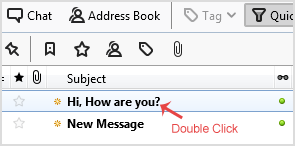
open-email.gif


3. In the top area on right side, click on the "Reply" button.
reply-to-email.gif


4. Type your message in a message box and click "Send".
send-reply-mozilla-thunderbird.gif


Ця відповідь Вам допомогла?

Схожі статті

Cómo configurar una cuenta de Email de cPanel con Mozilla Thunderbird? Thunderbird is a nice email client software for managing your email. You can setup a cPanel email... Cómo comprobar si hay nuevo Email en Mozilla Thunderbird? Thunderbird is an Email Client Software and you can work with it in the following way. 1. Open... Cómo enviar un Email utilizando Mozilla Thunderbird? You can send email using Thunderbird. It is very easy because you do not need to manually login... Cómo borrar un mensaje de Email en Mozilla Thunderbird? If you want to remove email from Mozilla Thunderbird, you can easily do it but if you use IMAP,... Cómo reenviar Email en Mozilla Thunderbird? You can forward email to others email accounts using Mozilla Thunderbird. 1. Open Mozilla...
« Назад

  Хмара міток

cpanel csr ssl memory php cpane htaccess awstats block ip ip password DNS A Record access MX email domains register transfer Spam Reseller Bandwidth VPS upgraded WHM 403 Forbidden max_upload upload wordpress BoxTrapper Android movil correos e-mail SiteWorx SolusVM timezone datatime Contraseña

  Підтримка

Підтримка
News
База знань
Файли
Статус мережі
Відкрити тікет
  • Зв'язок з нами
  • ПРАВИЛАМИ КОРИСТУВАННЯ ПОСЛУГ

Авторське право © 2026 Reselhost. Всі права захищені.


Завантаження...
Завантаження...
Обрати мову
العربية
Azerbaijani
Català
中文
Hrvatski
Čeština
Dansk
Nederlands
English
Estonian
Persian
Français
Deutsch
עברית
Magyar
Italiano
Macedonian
Norwegian
Português
Português
Română
Русский
Español
Svenska
Türkçe
Українська

Оберіть валюту

$ USD
AR$ ARS
R$ BRL
€ EUR
MXN MXN
CLP CLP
COP COP
S/ SOL
£ GBP

Створити пароль

Будь ласка, введіть число від 8 до 64 для довжини пароля